Priority Inversion in Swift: Why DispatchSemaphore Is a Poor Lock
Why is DispatchSemaphore a bad lock when it comes to priority inversion?
Because a semaphore has no concept of an owner. It manages a count of permits, and signal() may be called by any thread, not necessarily the one that called wait(). When a high-priority thread blocks in wait(), this mechanism does not tell the system which specific thread needs help to finish its work. For mutual exclusion, it is better to use a primitive with a known owner. Apple explicitly explains this difference between dispatch_semaphore and owner-aware locks in its tech talk on CPU scheduling.
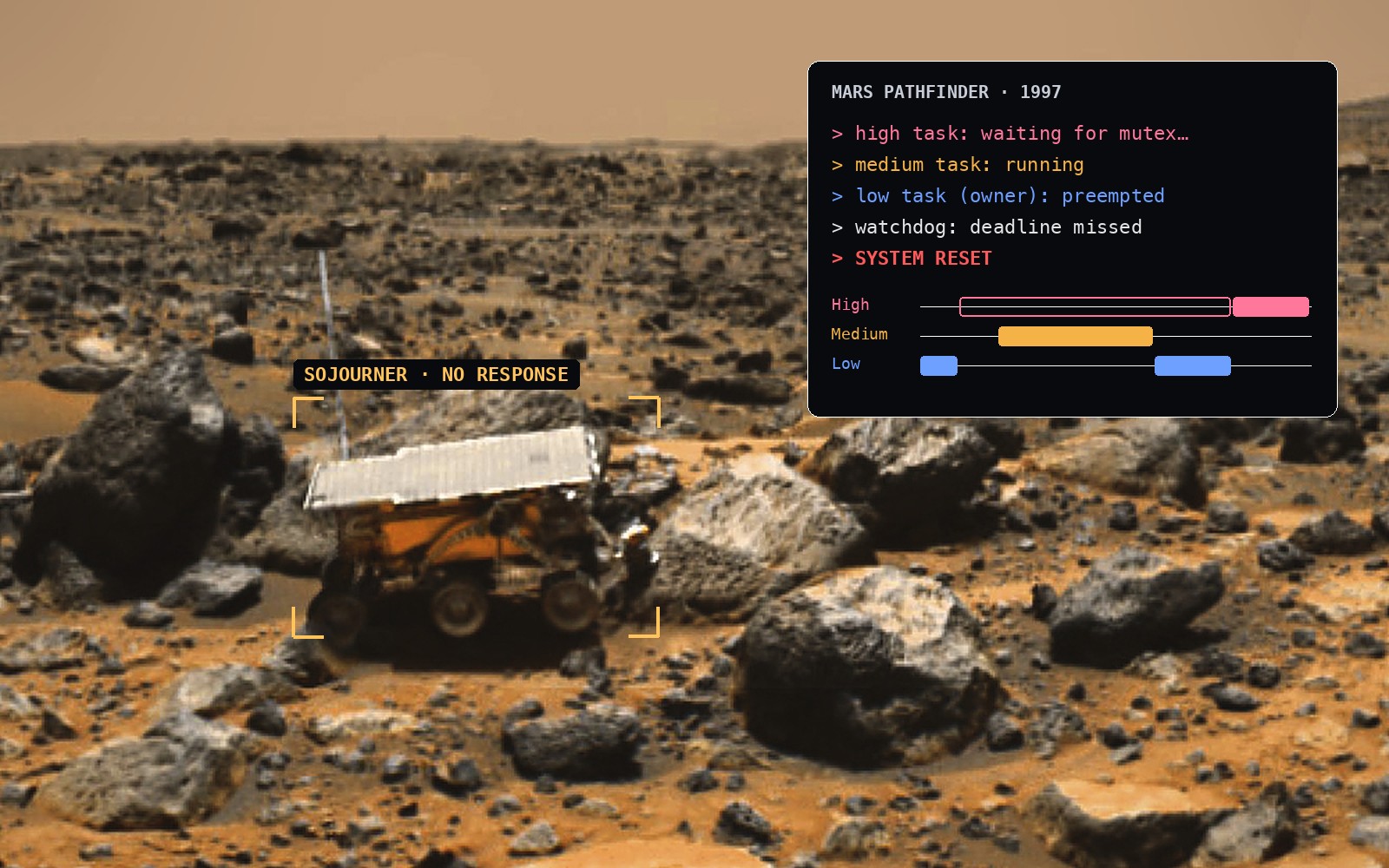
The rover on the cover is not a random choice: in 1997, priority inversion kept resetting the computer of the Mars Pathfinder lander that carried Sojourner to Mars. How that happened is explained below.
On an iPhone, this kind of dependency can show up as UI lag. On Mars Pathfinder, it led to resets of the lander’s computer. Three threads and one resource are enough to understand both cases.
TL;DR
DispatchSemaphorehas no owner. When High waits inwait(), the system does not know which thread to help, so Medium can keep preempting Low while High keeps waiting.- Priority inheritance works only when the owner is known. In Swift 6,
Synchronization.Mutexon Darwin is built onos_unfair_lock, so the system can see who holds the lock. - On Mars Pathfinder in 1997, this kind of inversion kept resetting the lander’s computer. The team fixed it by enabling priority inheritance for the mutex.
- The compiler does not check a semaphore used as a lock: with
@unchecked Sendableyou can forgetwait()and silently lose data.Mutexdoes not let that code compile. You can run both versions right in the article. - Do not wait for a
Taskwith a semaphore: it ties up a cooperative pool thread and can deadlock. Useawait.
What priority inversion is
Picture one CPU and three threads with fixed priorities: High > Medium > Low. The scheduler gives the CPU to the highest-priority thread that is ready to run. A thread waiting for a held lock is not ready: it cannot make progress without the resource.
- Low takes the lock and starts modifying shared data.
- High wakes up, tries to take the same lock, and blocks.
- Medium becomes ready. It does not need this resource at all, but its priority is higher than Low’s, so it gets the CPU.
- Low does not finish its critical section, the lock stays held, and High keeps waiting.
🔎 What to watch: keep your eye on the CPU row while it plays. While High waits for the lock, the CPU goes to Medium, not to Low, which holds the lock. The “High waits” counter shows how long the wait lasts, and “Caused by Medium” shows how much of it Medium takes.
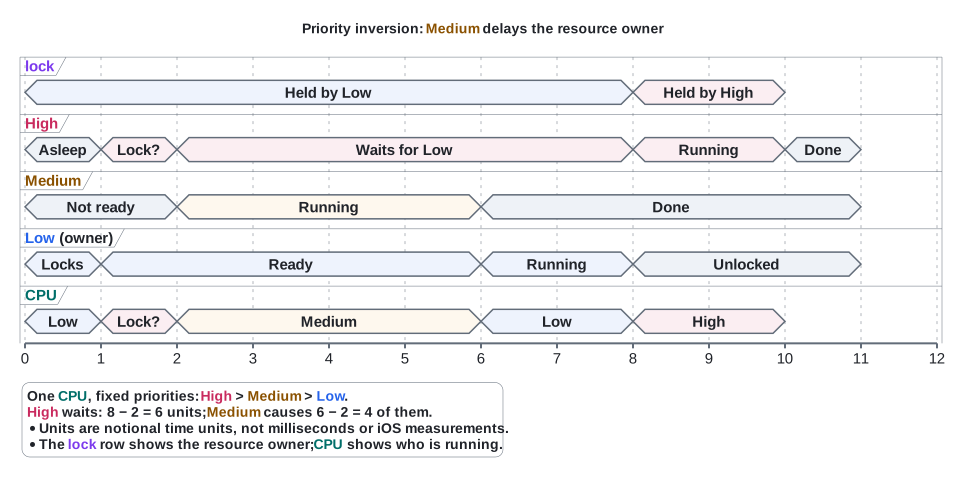
* Units are notional time units: one axis tick is one unit. This is a teaching scale, not milliseconds or a measurement of iOS performance. High waits from t=2 to t=8: 8 − 2 = 6 units; Medium’s work from t=2 to t=6 accounts for 6 − 2 = 4 of them.
* The lock row shows who owns the resource; the CPU row shows who is running. The bar color identifies the thread: High, Medium, or Low.
This is a teaching model of one CPU with fixed priorities. The steps on the time axis are notional; they do not show measurements or the exact behavior of the iOS scheduler.
High depends on Low for as long as Low is modifying the shared data, and that part is unavoidable. A third participant makes the inversion worse: Medium extends High’s wait even though Medium has a lower priority than High and does not use the resource High needs.
This is called unbounded priority inversion: the delay is no longer limited to the rest of Low’s short critical section. That does not mean every call will necessarily hang forever. In the model above, any Medium work that becomes ready can postpone Low’s completion again.

Jim has to finish working on the file Michael is waiting for. Dwight occupies the only “CPU” with other work. In an office, this looks like an ordinary Monday; a scheduler needs a more precise description of the dependency.
A real iOS device has multiple cores, QoS classes, and a more complex scheduling policy. More cores do not remove the dependency on a held resource. Apple separately warns about priority inversions caused by QoS mismatches and the lack of automatic priority propagation when waiting on a semaphore in the Thread Performance Checker documentation.
How priority inheritance helps the owner
Priority inheritance means temporarily raising the effective priority of a lock’s owner while a higher-priority thread waits for that lock. In our model, Low gets the chance to finish its critical section before Medium runs. Once the lock is released, High can continue, and Low no longer needs the temporary boost.
🔎 What to watch: compare the CPU row with the previous diagram. Here Low gets a temporary boost and runs before Medium. Medium arrives at the same moment as in the previous diagram, but waits for the CPU (the striped bar in its row). So the “High waits” counter shows 2 units instead of 6.
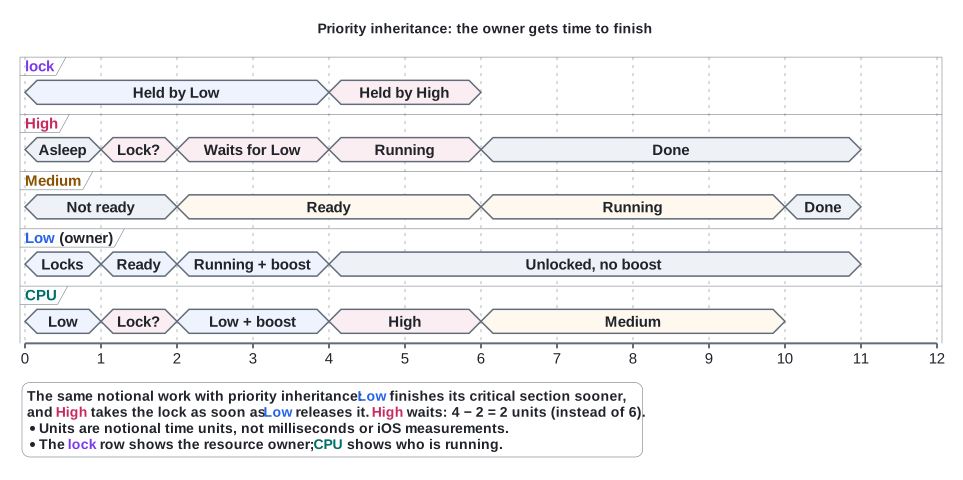
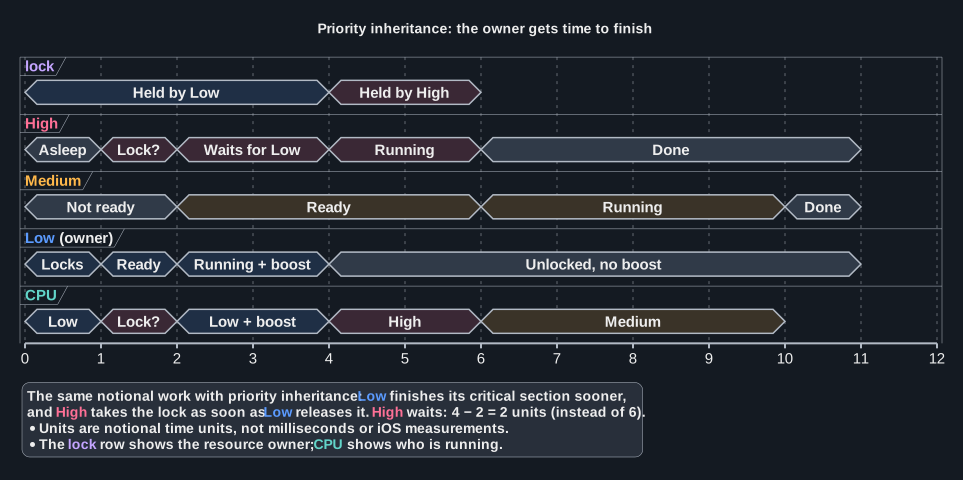
* Units are notional time units: one axis tick is one unit. This is a teaching scale, not milliseconds or a measurement of iOS performance. High waits from t=2 to t=4: 4 − 2 = 2 units, instead of 6 in the diagram without priority inheritance.
* The lock row shows who owns the resource; the CPU row shows who is running. The bar color identifies the thread: High, Medium, or Low.
The amount of work is the same. What changed is the order: the owner can release the resource before Medium’s unrelated work gets the CPU.
High does not take the lock away from Low and does not read half-modified data. The goal of the mechanism is to help the thread whose completion High depends on.

The file still belongs to Jim. A temporary boost lets him finish the work; after that, Michael gets the result.
What actually happened on Mars Pathfinder
Pathfinder landed in Ares Vallis on July 4, 1997. The mission included a lander and the Sojourner rover. The priority inversion story concerns resets of the lander’s computer, not of the rover.
According to Glenn Reeves, who led the flight software team, the high-priority task bc_dist distributed the data collected from the 1553 bus. The ASI/MET meteorological task ran at a lower priority. Their IPC used VxWorks pipe() and select(), which internally relied on a mutex protecting the wait list of file descriptors.
ASI/MET held that resource when tasks of medium priority preempted it. bc_dist blocked on the same mutex. It did not finish its work before the next cycle, the deadline check in bc_sched detected the failure, and the system reset the computer.
The team reproduced the problem on Earth and enabled priority inheritance by changing a global variable that sets the creation options of these mutexes. The change applied to every select() mutex created after the change, not only to the one used for bc_dist and ASI/MET: the initialization logic offered no easy way to target just that one. They verified the effect before sending the patch to the spacecraft. Reeves explicitly notes that the fix was delivered through a dedicated patching mechanism, not through the VxWorks shell.
The names are easy to mix up here: VxWorks calls this primitive a mutual exclusion semaphore. It has an owner; it is not the same thing as the counting DispatchSemaphore in Swift. The failure shows that even a mutex needs the right configuration and scheduling support for priority inheritance.
Early images of the lander, the ramps, and Sojourner are available in NASA’s historical catalog.
Anti-pattern: DispatchSemaphore(value: 1) instead of a lock
Here is a class that protects access to an array with a semaphore:
// ════════════════════════════════════════════════════════════════
// ▶ ARTICLE EXAMPLE: the code discussed in the article
// ════════════════════════════════════════════════════════════════

import Dispatch

final class SemaphoreResource: @unchecked Sendable {
    private let gate = DispatchSemaphore(value: 1)
    private var data: [String] = []

    func append(_ value: String) {
        gate.wait()
        defer { gate.signal() }
        data.append(value)
    }

    func snapshot() -> [String] {
        gate.wait()
        defer { gate.signal() }
        return data
    }
}

// ────────────────────────────────────────────────────────────────
// ◇ DEMO HARNESS: not part of the example. It only runs the code
//   above and prints the result. Change it freely in the editor.
// ────────────────────────────────────────────────────────────────

import Foundation

print("▶ Start at \(Date.now)\n")

let resource = SemaphoreResource()
DispatchQueue.concurrentPerform(iterations: 1_000) { index in
    resource.append("value-\(index)")
}
let values = resource.snapshot()
print("Appended from 1,000 concurrent calls: \(values.count) values")
print("Every value is unique: \(Set(values).count == values.count)")

// ▷ Try: add a method that reads `data` without gate.wait(). The compiler
//   stays silent: @unchecked Sendable switched that check off.

value: 1 lets one thread at a time into the critical section. The others wait. defer guarantees signal() when the method exits after a successful wait(). Both methods follow the same rule, so this implementation has no data race on its own.
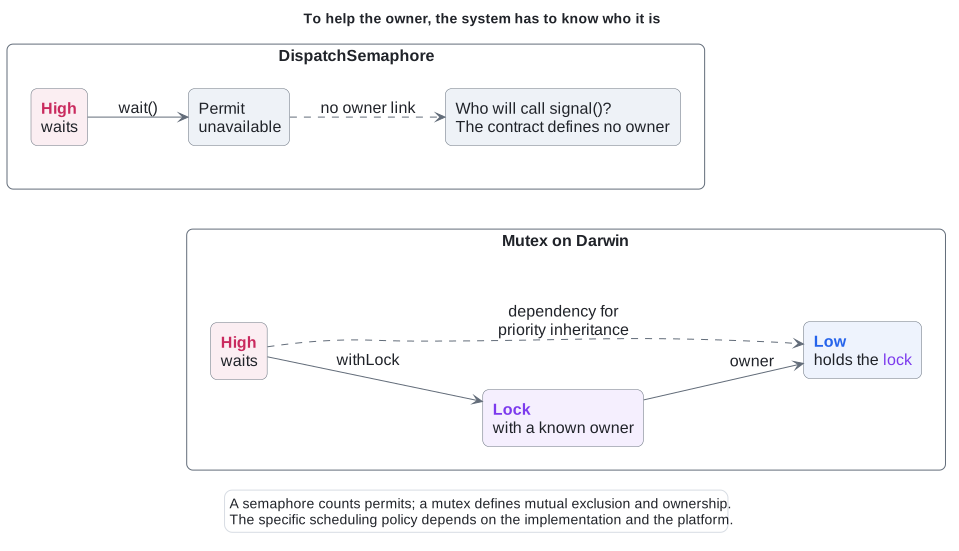
The problem is in the primitive’s contract. Low called wait() and went inside. High now waits for a permit, but the semaphore does not require that Low be the one to call signal(). Such an API has no “this waiter depends on this owner” relationship. When a semaphore is used as a lock, the ownership rule exists only in the developer’s head.
🔎 What to watch: compare the two parts of the diagram. In the DispatchSemaphore part, the wait of High leads to no particular thread. In the “Mutex on Darwin” part, it leads to the owner Low, so the system knows whom to help.
@unchecked Sendable has a cost here too: the author of the class manually promises the compiler that all access to the mutable state is synchronized. If someone adds a method tomorrow that reads data without wait(), that promise becomes false. The attribute does not check the implementation for us.
Synchronization.Mutex in Swift 6
For short synchronous access to shared state, you can use Mutex. In the code below, the compiler checks the class’s Sendable conformance without @unchecked on our type:
// ════════════════════════════════════════════════════════════════
// ▶ ARTICLE EXAMPLE: the code discussed in the article
// ════════════════════════════════════════════════════════════════

import Synchronization

final class MutexResource: Sendable {
    private let data = Mutex<[String]>([])

    func append(_ value: String) {
        data.withLock { protectedData in
            protectedData.append(value)
        }
    }

    func snapshot() -> [String] {
        data.withLock { $0 }
    }
}

// ────────────────────────────────────────────────────────────────
// ◇ DEMO HARNESS: not part of the example. It only runs the code
//   above and prints the result. Change it freely in the editor.
// ────────────────────────────────────────────────────────────────

import Dispatch
import Foundation

print("▶ Start at \(Date.now)\n")

let resource = MutexResource()
DispatchQueue.concurrentPerform(iterations: 1_000) { index in
    resource.append("value-\(index)")
}
let values = resource.snapshot()
print("Appended from 1,000 concurrent calls: \(values.count) values")
print("Every value is unique: \(Set(values).count == values.count)")

// ▷ Try: add a method that reads the array without withLock. There is no
// unprotected array to reach: it lives inside the Mutex.The array is stored inside the mutex. withLock provides exclusive access to it and releases the lock after the closure, including when the closure throws. snapshot() returns the array’s value, not a reference to an unprotected mutable object.
In Swift 6.0’s Darwin implementation, Mutex is built on os_unfair_lock. Apple documents the owner-thread information that the system may use to try to resolve priority inversion. That ownership information is what the system needs to help Low.
A withLock call does not have to enter the kernel every time. The API also does not promise that High runs immediately or in FIFO order, and it does not protect you from long work done while holding the lock. In SE-0433, the guarantee is stated as mutual exclusion; specific scheduling properties depend on the platform.
The example targets Swift 6 and iOS 18+ / macOS 15+. The compiler version and the minimum OS version are separate requirements: installing a new Xcode does not by itself make the API available on an older OS.
Forget the lock and see what happens
The promise behind @unchecked Sendable is easy to break. On the left, a semaphore-based counter whose increment() forgets gate.wait(). The compiler stays silent. On the right, the same counter built on Mutex: the value lives inside the mutex, so the only way to change it is withLock, and value += 1 outside it does not compile. Press “Run both”: on the left some increments get lost, on the right the count is exactly 1,000,000.
With the bug
// ════════════════════════════════════════════════════════════════
// ▶ ARTICLE EXAMPLE: the code discussed in the article
// ════════════════════════════════════════════════════════════════

import Dispatch

final class Counter: @unchecked Sendable {
    private let gate = DispatchSemaphore(value: 1)
    private var value = 0

    func increment() {
        value += 1 // Bug: no gate.wait()
    }

    func read() -> Int {
        gate.wait()
        defer { gate.signal() }
        return value
    }
}

// ────────────────────────────────────────────────────────────────
// ◇ DEMO HARNESS: not part of the example. It only runs the code
//   above and prints the result. Change it freely in the editor.
// ────────────────────────────────────────────────────────────────

import Foundation

print("▶ Start at \(Date.now)\n")

let counter = Counter()
DispatchQueue.concurrentPerform(iterations: 1_000_000) { _ in
    counter.increment()
}
print("Counted \(counter.read()) of 1000000 increments")

// ▷ Try: add gate.wait() and defer { gate.signal() } to increment().
// The count becomes exact, but only because you remembered.Fixed
// ════════════════════════════════════════════════════════════════
// ▶ ARTICLE EXAMPLE: the code discussed in the article
// ════════════════════════════════════════════════════════════════

import Synchronization

final class Counter: Sendable {
    private let value = Mutex(0)


    func increment() {
        value.withLock { $0 += 1 }
    }

    func read() -> Int {
        value.withLock { $0 }


    }
}

// ────────────────────────────────────────────────────────────────
// ◇ DEMO HARNESS: not part of the example. It only runs the code
//   above and prints the result. Change it freely in the editor.
// ────────────────────────────────────────────────────────────────

import Foundation

print("▶ Start at \(Date.now)\n")

let counter = Counter()
DispatchQueue.concurrentPerform(iterations: 1_000_000) { _ in
    counter.increment()
}
print("Counted \(counter.read()) of 1000000 increments")

// ▷ Try: write value += 1 without withLock. The compiler rejects it,
// so the lock cannot be forgotten.What changed
-import Dispatch
+import Synchronization

-final class Counter: @unchecked Sendable {
-    private let gate = DispatchSemaphore(value: 1)
-    private var value = 0
+final class Counter: Sendable {
+    private let value = Mutex(0)

     func increment() {
-        value += 1 // Bug: no gate.wait()
+        value.withLock { $0 += 1 }
     }

     func read() -> Int {
-        gate.wait()
-        defer { gate.signal() }
-        return value
+        value.withLock { $0 }
     }
 }
The playground cannot show priority inversion itself. We checked: on its Linux server, High waited just as long with a semaphore as with Mutex. So the diagrams above explain the inversion, and this example shows another cost of using a semaphore as a lock: the compiler does not check that every access to the state goes through wait().
What belongs in a critical section
When the lock is contended, Mutex blocks the calling thread, and it is not recursive. Inside withLock, we keep a short operation on the state. We do not make a network request, perform disk I/O, wait for another task, or call an arbitrary callback. Calling withLock on the same mutex from inside its own critical section is a bug: the behavior is platform-dependent, and some platforms may crash the process or deadlock.
The withLock closure is synchronous, so you cannot await inside it. Take the snapshot of the state you need, release the lock, and only then do the asynchronous work. If you need to apply the result after await, the state may have changed in the meantime, so check the relevant conditions again.
A semaphore inside a Task sets another trap
It is tempting to wrap an async operation in a Task and wait for its result synchronously with a semaphore. If that wait runs on a thread from the cooperative pool, it occupies the thread, while the work that has to call signal() may need a thread from the same pool. Under enough load, this can cause a deadlock.
On the left is this anti-pattern. The program starts as many tasks as it sees cores, and each one waits for an inner Task with a semaphore. No thread is left to run the inner tasks, so the program hangs until the playground stops it after 10 seconds. On the right, currentValue() becomes async and waits with await: the task suspends and frees its thread.
With the bug
// ════════════════════════════════════════════════════════════════
// ▶ ARTICLE EXAMPLE: the code discussed in the article
// ════════════════════════════════════════════════════════════════

import Dispatch

func loadValue() async -> Int { 42 }

final class Box: @unchecked Sendable {
    var value = 0
}

// Waits for async work on a blocked thread.
func currentValue() -> Int {
    let done = DispatchSemaphore(value: 0)
    let box = Box()
    Task {
        box.value = await loadValue()
        done.signal()
    }
    done.wait() // Bug: blocks a pool thread
    return box.value
}

// ────────────────────────────────────────────────────────────────
// ◇ DEMO HARNESS: not part of the example. It only runs the code
//   above and prints the result. Change it freely in the editor.
// ────────────────────────────────────────────────────────────────

import Foundation

print("▶ Start at \(Date.now)\n")

let workers = ProcessInfo.processInfo.activeProcessorCount
print("Starting \(workers) tasks, one per core")
let total = await withTaskGroup(of: Int.self) { group in
    for _ in 0..<workers {
        group.addTask { currentValue() }
    }
    var sum = 0
    for await value in group { sum += value }
    return sum
}
print("All tasks finished, sum: \(total)")

// ▷ Try: start workers - 1 tasks. A free pool thread runs the inner
// Task and the program finishes, which is how this bug hides in tests.Fixed
// ════════════════════════════════════════════════════════════════
// ▶ ARTICLE EXAMPLE: the code discussed in the article
// ════════════════════════════════════════════════════════════════


func loadValue() async -> Int { 42 }

// Suspends the task and frees its thread.
func currentValue() async -> Int {
    await loadValue()


}

// ────────────────────────────────────────────────────────────────
// ◇ DEMO HARNESS: not part of the example. It only runs the code
//   above and prints the result. Change it freely in the editor.
// ────────────────────────────────────────────────────────────────

import Foundation

print("▶ Start at \(Date.now)\n")

let workers = ProcessInfo.processInfo.activeProcessorCount
print("Starting \(workers) tasks, one per core")
let total = await withTaskGroup(of: Int.self) { group in
    for _ in 0..<workers {
        group.addTask { await currentValue() }
    }
    var sum = 0
    for await value in group { sum += value }
    return sum
}
print("All tasks finished, sum: \(total)")

// ▷ Try: start 100 tasks instead of workers. They suspend rather than
// block, so the program still finishes.What changed
-import Dispatch
-
 func loadValue() async -> Int { 42 }

-final class Box: @unchecked Sendable {
-    var value = 0
-}
-
-// Waits for async work on a blocked thread.
-func currentValue() -> Int {
-    let done = DispatchSemaphore(value: 0)
-    let box = Box()
-    Task {
-        box.value = await loadValue()
-        done.signal()
-    }
-    done.wait() // Bug: blocks a pool thread
-    return box.value
+// Suspends the task and frees its thread.
+func currentValue() async -> Int {
+    await loadValue()
 }
Apple explains the forward-progress contract and the danger of hidden dependencies in Swift concurrency: Behind the scenes. To wait for an async result, use await; to adapt a callback API, use a continuation and resume it exactly once.
When the state belongs to an asynchronous component, consider an actor. Waiting for access to an actor can suspend the task and free the thread for other work. At the same time, when an actor method suspends at an await, the actor can run other calls in the meantime, so re-check any assumption about its state after each suspension point. This model is described in The Swift Programming Language.
What the example verifies
The archive with the complete Swift files contains both implementations and a verification program. It adds 10,000 unique values from concurrent calls, reads snapshots while writes are in progress, and checks the final set of values.
You can run the verification program right here. It runs on an online playground with a Linux toolchain, so it checks the same data integrity, not the Darwin scheduler.
// ════════════════════════════════════════════════════════════════
// ▶ ARTICLE EXAMPLE: the code discussed in the article
// ════════════════════════════════════════════════════════════════

import Dispatch

// Adds unique values from concurrent workers, reads snapshots while they
// are still writing, and checks that both resources kept every value.
func verifyResources(iterations: Int = 10_000) {
    let semaphoreResource = SemaphoreResource()
    let mutexResource = MutexResource()

    DispatchQueue.concurrentPerform(iterations: iterations) { index in
        let value = String(index)
        semaphoreResource.append(value)
        mutexResource.append(value)

        // Exercise reads while other workers are still writing.
        if index.isMultiple(of: 997) {
            precondition(semaphoreResource.snapshot().count <= iterations)
            precondition(mutexResource.snapshot().count <= iterations)
        }
    }

    let expected = Set((0..<iterations).map(String.init))
    let semaphoreValues = semaphoreResource.snapshot()
    let mutexValues = mutexResource.snapshot()
    precondition(semaphoreValues.count == iterations)
    precondition(mutexValues.count == iterations)
    precondition(Set(semaphoreValues) == expected)
    precondition(Set(mutexValues) == expected)
    print("Both resources retained all \(iterations) unique values.")
    print("This checks data integrity, not scheduling or priority inheritance.")
}

// ────────────────────────────────────────────────────────────────
// ◇ DEMO HARNESS: not part of the example. It only runs the code
//   above and prints the result. Change it freely in the editor.
// ────────────────────────────────────────────────────────────────

import Foundation

print("▶ Start at \(Date.now)\n")

verifyResources()

// ▷ Try: call verifyResources(iterations: 100_000). It still passes: both
// classes guard every access, so this checks integrity, not scheduling.To build it locally:
swiftc -swift-version 6 -strict-concurrency=complete -warnings-as-errors \
  Resources.swift main.swift -o resource-check
./resource-check
▶ Start at 2026-11-09 11:43:06 +0000
Both resources retained all 10000 unique values.
This checks data integrity, not scheduling or priority inheritance.The example was compiled with Apple Swift 6.4.2 in Swift 6 mode, and the check was run on macOS. The code was also type-checked separately for iOS 18. This verifies the correctness of data access; it is not a benchmark and not proof of a scheduler policy. A random order of print() calls or an artificial sleep() would not prove priority inheritance either.
When you see this in an app, start with the Thread Performance Checker: find out who is waiting, what exactly they are waiting for, and whose progress would unblock them. Then check how long the critical section takes and the priorities of the work. A .background QoS class on its own does not explain the dependency.
How to choose a primitive
| Need | Where to start |
|---|---|
| Briefly modify shared state synchronously | Mutex, if the deployment target allows it |
| Own the state of an asynchronous component | actor, keeping reentrancy in mind |
| Wait for an async operation to finish | await, without blocking a thread on a semaphore |
| Count permits that another thread or task may return | A semaphore may fit the model; evaluate blocking and dependencies separately |
For mutual exclusion, information about the resource’s owner matters. It lets the system help the thread that urgent work depends on. In Swift, Mutex also adds a useful boundary in the code: the state lives inside the protecting primitive, and access to it goes through withLock.
Priority inheritance does not shorten a long critical section and does not fix wrong dependencies. Choose the right primitive, keep only short work under the lock, and let async code wait without occupying a thread. These are the decisions that determine how long High actually waits.
Additional resources
- NASA: Mars Pathfinder, mission overview
- NASA NSSDCA: historical Mars Pathfinder images
- Glenn Reeves: “What Really Happened on Mars?” (December 15, 1997)
- Apple: Tune CPU job scheduling for Apple silicon games (owner-aware primitives)
- Apple: Diagnosing performance issues early (Thread Performance Checker)
- Apple: os_unfair_lock_lock (owner and fairness limits)
- Swift Evolution SE-0433: Synchronous Mutual Exclusion Lock
- Swift 6.0: Mutex source code
- Swift 6.0: DarwinImpl.swift
- Apple WWDC21: Swift concurrency: Behind the scenes
- The Swift Programming Language: Concurrency
- Code examples in the online editor:
SemaphoreResource.swift,MutexResource.swift,CounterSemaphore.swift,CounterMutex.swift,TaskSemaphore.swift,TaskAwait.swift,main.swift - PlantUML: timing diagram syntax
- Diagram sources: inversion, inheritance, owner dependency.
Discussion
Comment translation
No languages found.